Table of Contents
If you’ve ever felt lost in the matrix of a thousand similar long-tail queries in Google Search Console (GSC), you are not alone. It’s like trying to understand a novel by reading every single letter in isolation. But guess what? Google just handed us a giant highlighter.
Google’s new Query Groups feature, found within Search Console Insights, solves this problem. It’s an AI-powered tool that automatically bundles these fragmented queries into cohesive topic clusters, allowing you to focus on user intent at scale.
What Are Query Groups and How Do They Work?
Query Groups is an AI clustering mechanism, it is not a new ranking factor; it’s a reporting layer designed for strategy.
- Problem: Queries like “best running shoes for flat feet,” “flat feet running shoe reviews,” and “running shoes flat feet” clutter the data. All the same intent.
- Solution: Query Groups lumps all these variations into a single, high-level topic (e.g., “Running Shoes for Flat Feet“).
- Result: You see the aggregate performance (total clicks, total impressions) for the entire topic, making it easy to see where your site truly wins or loses.
This AI clustering will save hours of manual data manipulation, allowing your team to instantly see the biggest themes driving traffic.
Action Stations: The Three Strategic Views
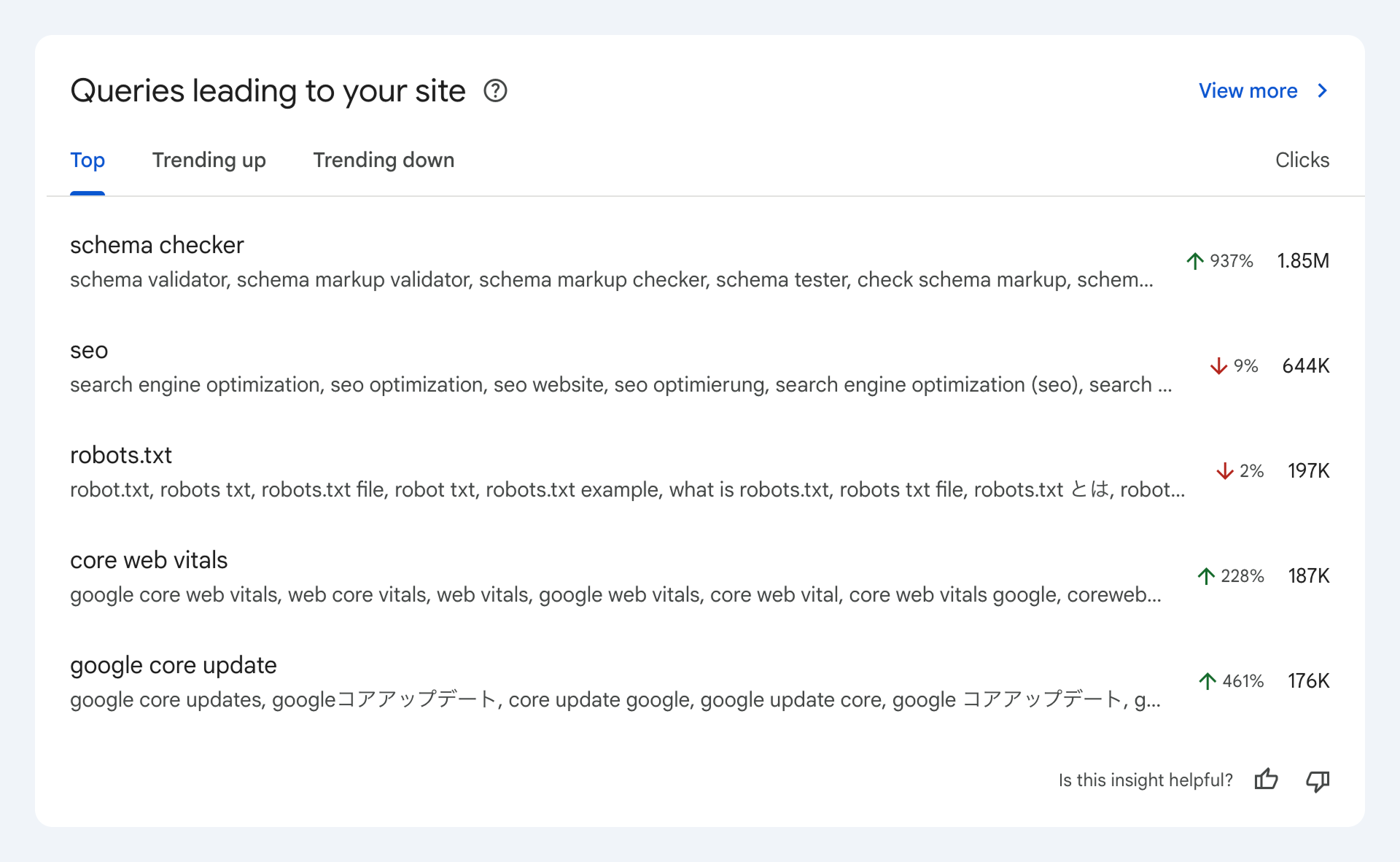
The new “Queries leading to your site” card in GSC Insights gives you three views for rapid content planning:
| Group Category | The Data Signal | Your Content Strategy |
| Top | Highest Click Volume | Defend & Dominate. Ensure this pillar content is linked heavily internally. Look for small gaps to create new cluster content. |
| Trending Up | Fastest-Growing Clicks | Priority Content Creation. This is an emerging or resurging user need. Invest immediate resources to cover the topic deeply and win new traffic. |
| Trending Down | Largest Click Decline | Content Decay Alert. Your competition is winning or the content is outdated. Schedule an urgent audit and refresh/rewrite. |
4 Ways to Win the SERPs with Clustering Data
Here’s how to turn that clustered data into tangible SEO results:
- Identify New Pillar Gaps: Find a Trending Up group that currently leads to a random, unoptimized page on your site. This is a clear signal from Google that a topic is hot, and you have a chance to build a dedicated, authoritative pillar page around it.
- Fine-Tune Your Snippets: Use the drill-down function on a Top group (high impressions, low CTR). See which exact phrases the group includes, and use that language to write a more compelling, intent-matching title and meta description.
- Validate Your Content Structure: If Google is clustering three of your separate pages into the same Query Group, it’s telling you the user intent is the same. Merge them! Consolidate those pages into one ultimate guide to avoid cannibalization and boost the authority of a single URL.
- Prevent Future Decay: Make the Trending Down list your monthly enemy. Use it to proactively update stale content with new stats, recent news, or fresh E-E-A-T signals before it loses half its value.
A Note on Rollout and Current Visibility
As of now, the Query Groups feature is rolling out gradually to properties with high query volume, meaning many users haven’t seen it yet.
However, don’t wait to start leveraging intent! The existing Search Console Insights report already shows valuable data like your Top Pages and Trending Queries right now. This is a great place to start your content audits before the full Query Groups feature arrives.
Have you seen the Query Groups card yet? Share your thoughts and initial findings on social media using #QueryGroups and tag our website, we’d love to see how you’re using the new data!
Reference Link: https://developers.google.com/search/blog/2025/10/search-console-query-groups?hl=en